Create a Leave Request:
Go to the employee's profile. In the menu at the top, navigate to:
Absence → Leave & Absence → + (Add button)
Select the appropriate leave type from the drop-down menu and enter the relevant dates.
Approve a Leave Request:
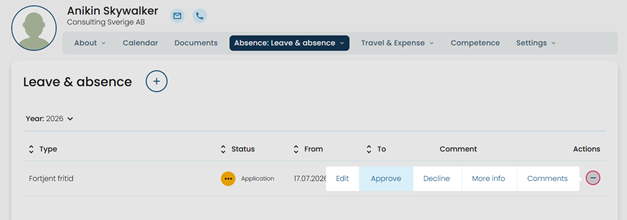
Locate the leave request in the overview and click the Actions button (the round button with three dots). Then select: Approve
Approve Multiple Leave Requests at Once:
If you want to approve several leave requests at the same time, navigate to:
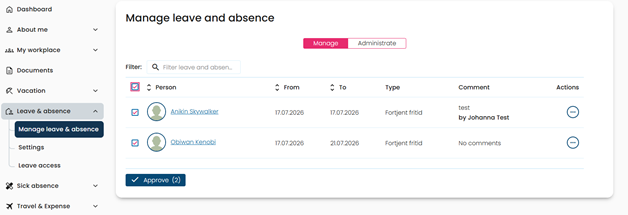
Leave & Absence → Manage leave & absence
Select the requests you want to approve by checking the corresponding boxes, then click Approve.
Submit a Leave Request as an Employee:
To submit a leave request as a regular employee, navigate to:
About Me → My Leave & Absence → + (Add button)
Select the appropriate leave type, enter the required information, and submit your request.
Was this article helpful?
That’s Great!
Thank you for your feedback
Sorry! We couldn't be helpful
Thank you for your feedback
Feedback sent
We appreciate your effort and will try to fix the article