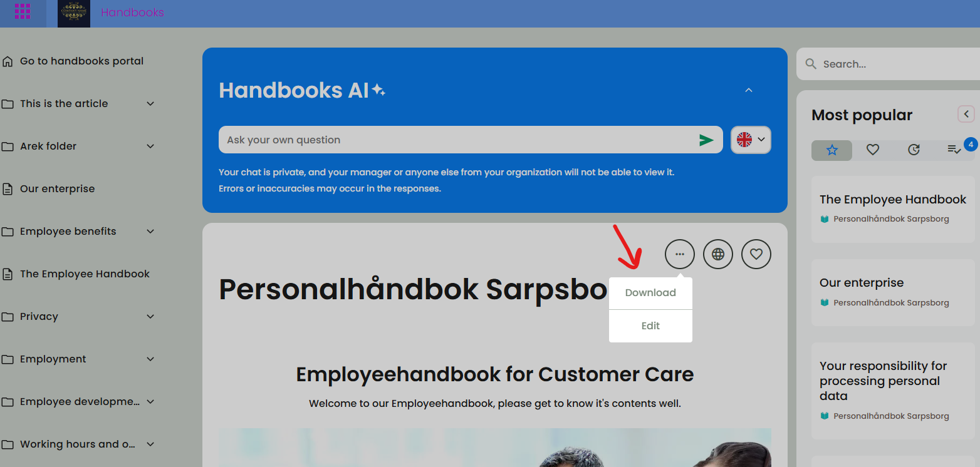
If you have are administrating the handbooks, you are able to download pdf of the handbook entirely, or pick which articles you want to download at the same time. If you are an employee there are more limitations, and you are not able to download an entire handbook, but you can download articles or folders by clicking on the round button with three dots.
To download the whole handbook, make sure you are logged in, click on the handbook, then the round button with three dots and choose Download:
To control that you are logged in, click on the global menu on the top left. You should see your name and customer number. If you don’t see your name, then log out and log in again.
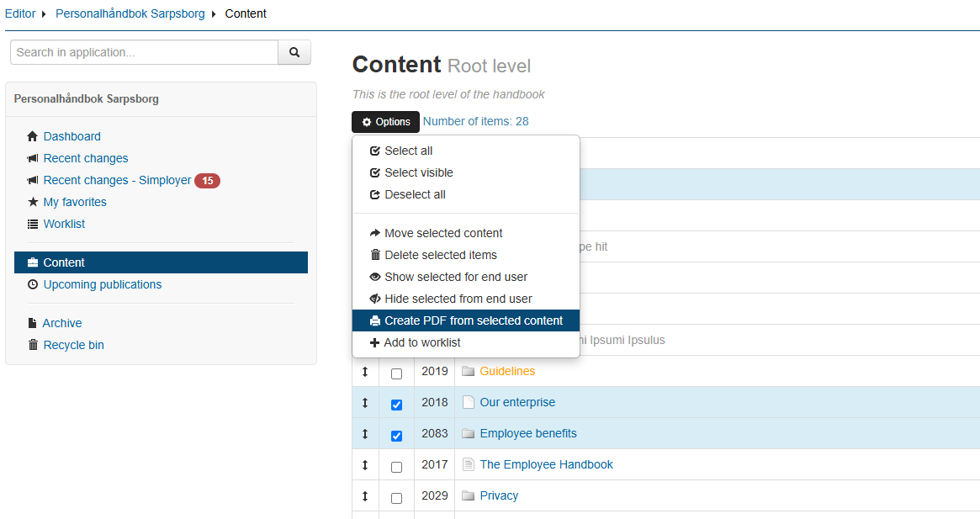
For downloading specific folders or articles, click on Edit -> Content –> Choose the articles or folders -> Options -> Download as pdf:
Was this article helpful?
That’s Great!
Thank you for your feedback
Sorry! We couldn't be helpful
Thank you for your feedback
Feedback sent
We appreciate your effort and will try to fix the article