How to create an API token in Tripletex
To connect Tripletex with SimployerOne, you need to create an API token in Tripletex. This must be done by a user with administrator access. See: Hvordan oppretter jeg en API-brukernøkkel?
Step-by-step instructions
- Log in to Tripletex as an administrator
Open your own administrator profile. You can do this in one of the following ways:- Click your profile icon in the top-right corner and select My profile, or
- Go to Salary → Employees and select the administrator user.
- Open API access
On the user profile page, select API access and then click New token.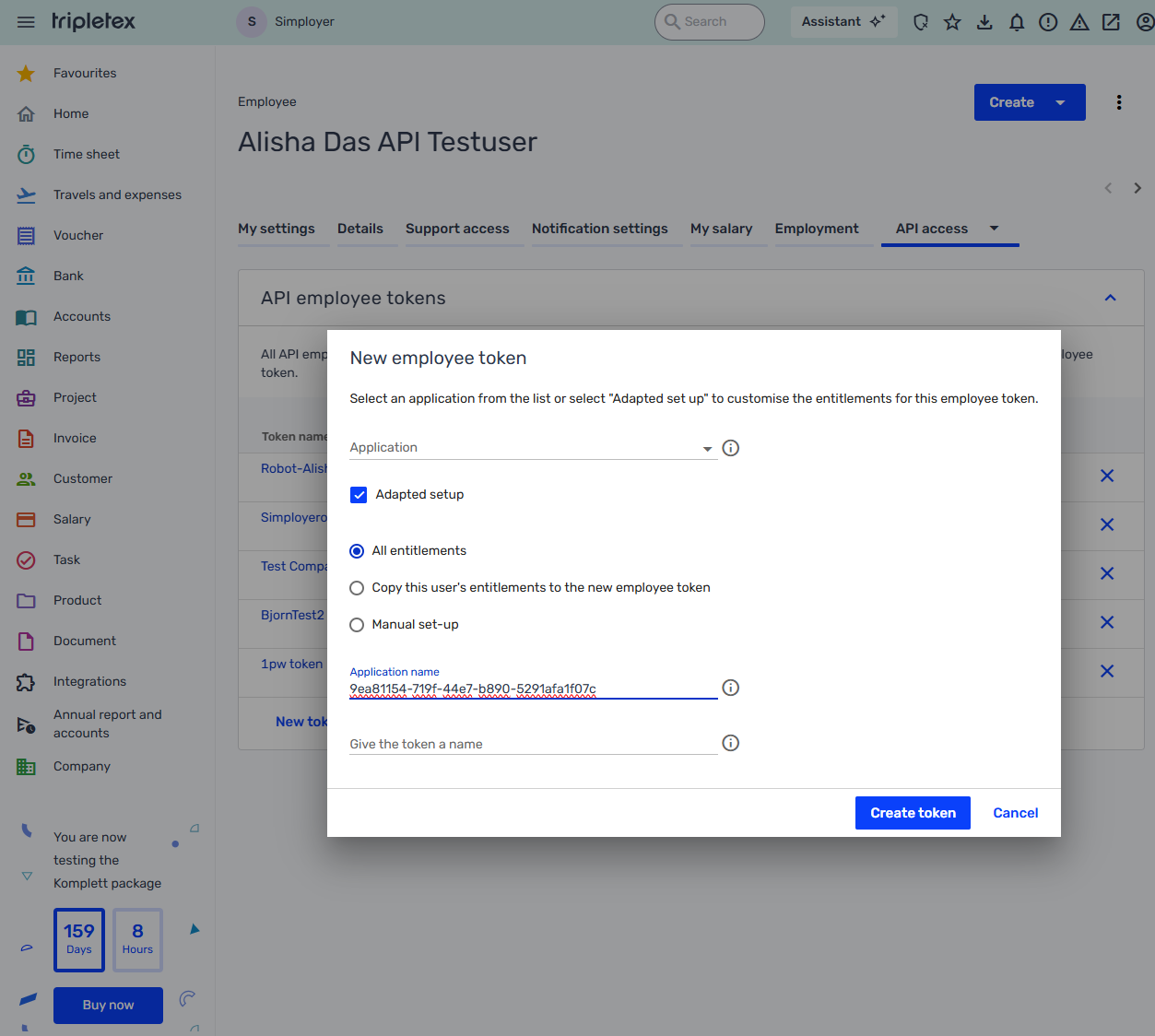
- Choose setup and permissions
- Select Adapted setup
- Choose All entitlements
- Enter application name
Enter the application name based on your environment:- Production: SimployerOne
- Production: SimployerOne
- Create the token
Click Create token.
The API token will be generated and displayed on the screen. - Complete the integration
Copy the generated token and use it when setting up the Tripletex integration in SimployerOne.
Was this article helpful?
That’s Great!
Thank you for your feedback
Sorry! We couldn't be helpful
Thank you for your feedback
Feedback sent
We appreciate your effort and will try to fix the article