Importing candidates
How to import candidates into your Recruitment database
Note: Candidates that have already been imported to Recruitment will be flagged as duplicates – email is the unique identifier.
Adding individual candidates
You can add candidates into Recruitment by clicking the pink '+' at the top right of most pages.
This will allow you to upload the candidate's CV, fill out their details, and also link them to an existing job, if required.
Bulk importing candidates
To import multiple candidates at once, head to the Candidates tab - Import Candidates - Bulk Import.
The bulk import can be done either by uploading a .zip folder of CVs, by multi-selecting CVs in the dialogue box." you can add on the end "or by uploading a .csv which will enable you to import a larger volume of candidate data but WITHOUT CV's. If you do the .csv upload, adding name and email address are mandatory, and phone number is optional.
If you want to import additional fields or CV's this would need to be done separately via a bespoke one-off paid candidate import where we will map the required fields specifically according to your needs" or something like that
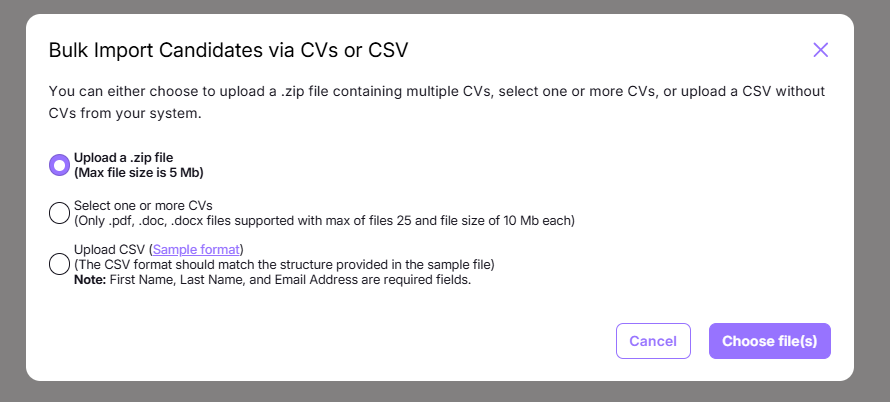
Note: When using the folder upload, your .zip file must be under 5mb. When using the mutli-select, your files must be under 10mb, with a maximum of 25 files. The files must be in a .pdf, .doc or .docx format.
Was this article helpful?
That’s Great!
Thank you for your feedback
Sorry! We couldn't be helpful
Thank you for your feedback
Feedback sent
We appreciate your effort and will try to fix the article